Independent bioprocess software comparison · Buyer guide

Acatian vs SuperPro Designer vs Roebling

Compare process simulation, bioreactor scale-up, production scheduling, techno-economic analysis, life-cycle assessment, capital planning, scenario modelling, collaboration, and engineering evidence before choosing a platform.
Acatian Engineering18 min buyer guide
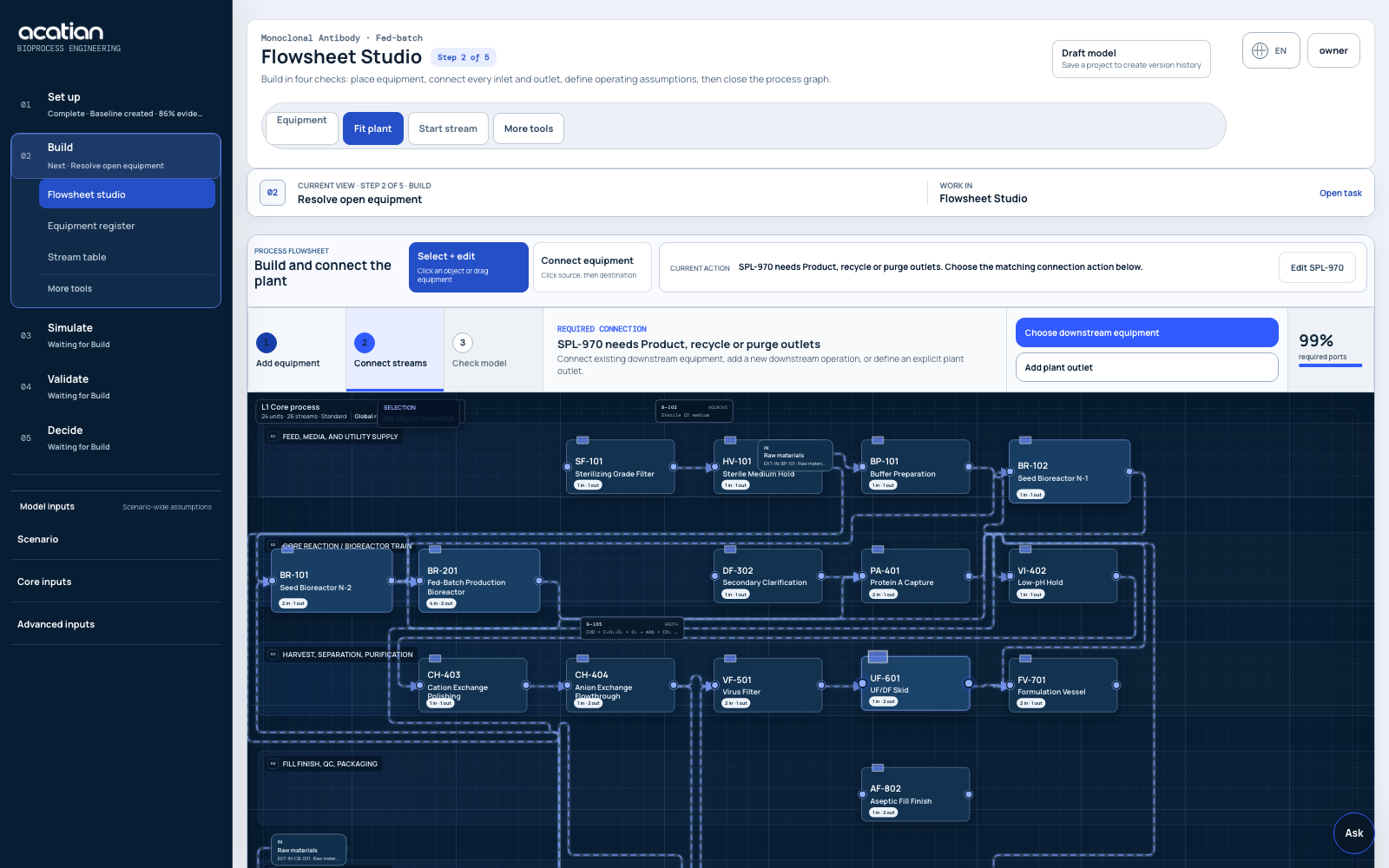
Acatian browser-based bioprocess engineering software with flowsheet, equipment and connected process streams
The right platform depends on whether the immediate job is detailed process simulation, capital-project delivery, or a shared and versioned bioprocess decision model.
01

Short answer

These products overlap, but they are not the same kind of purchase.

SuperPro Designer

SuperPro Designer is established Windows process simulation software for batch and continuous processes. Its official overview highlights 140+ unit procedures, material and energy balances, equipment sizing and costing, process economics, batch scheduling, resource tracking, debottlenecking, environmental assessment, and COM automation.

Roebling

Roebling presents itself as an AI-native engineering partner and deterministic platform spanning R&D, techno-economic analysis, FEL-0 and feasibility studies through option selection, FEED, FEL-3, and FID packages. The offer combines a living project model, data, and engineering expertise.

Acatian

Acatian is browser-based bioprocess engineering software. It connects editable flowsheets, balances, ODE/PDE dynamics, equipment, finite-capacity scheduling, TEA, LCA, uncertainty, sources, branches, collaboration, APIs, and engineering handoff in one versioned workspace.

Capability comparison

Acatian, SuperPro Designer, and Roebling at a glance

This comparison uses public product information reviewed on 11 September 2026. “Not detailed” means the capability was not described clearly on the official public page reviewed; it does not prove the capability is absent.
Decision criterionSuperPro DesignerRoeblingAcatian
Primary offerMature desktop process simulator.Engineering partner plus AI-native deterministic capital-project platform.Shared browser software for bioprocess modelling and plant decisions.
Process simulationBatch and continuous modelling with 140+ documented unit procedures, reactions, VLE, balances, sizing, and costing.First-principles physics and a dynamic project model are emphasized; the public page does not publish a comparable unit-operation catalogue.Editable plant graph, component and energy balances, reactions, operating modes, ODE/PDE models, physical constraints, and connected evidence.
Bioreactor scale-upFermentor and equipment models support established flowsheet calculations.Biomanufacturing and industrial scale-up sit within the broader engineering engagement.Links kinetics, OUR/OTR, kLa, mixing, gas handling, shear, heat removal, geometry, CFD screening, downstream load, and uncertainty.
Scheduling and capacityBatch scheduling, resource tracking, throughput analysis, debottlenecking, and integration with SchedulePro.Manufacturing scheduling detail is not specified on the official overview reviewed; confirm the required scope directly.Finite-capacity batches and campaigns across equipment, rooms, operators, utilities, inventory, CIP/SIP, maintenance, holds, QC, and changeovers.
TEA, CAPEX, and OPEXEquipment costing, thorough process economics, and environmental assessment within the simulator.TEA, unit economics, AACE cost-estimate classes, feasibility, option selection, FEED, and FID packages are central to the offer.Process-linked COGS, CAPEX, OPEX, cash flow, NPV, IRR, break-even, cost intervals, sensitivity, and source ownership for screening and engineering review.
LCA and sustainabilityEnvironmental impact assessment, emissions, and pollution-control modelling are documented.Sustainability scope is not detailed on the main official overview reviewed.Life-cycle inventory, functional unit, system boundary, allocation, impact categories, data quality, low/base/high ranges, and sensitivity stay tied to the process version.
Scenarios and uncertaintyParametric sensitivity and optimization can be automated through COM and external tools.Thousands of scenarios and traced uncertainty are prominent parts of the platform message.Named branches, before/after model differences, ODE/PDE trajectories, parameter intervals, sensitivity tables, and Monte Carlo-ready exports.
Collaboration and traceabilityStrong individual modeller workflow with customizable reports and file-based handoff.Shared live platform, source-linked figures, data library, and expert review.Roles, invitations, comments, model versions, source lineage, review state, rollback, audit context, and controlled exports around the same model.
Automation and dataCOM/OLE integrations with Excel, MATLAB, C#, Python, and other Windows tools.Centralized engineering data and an AI layer that assembles work around a deterministic solver.CSV, TSV, JSON, and historian-style intake plus REST, Python jobs, webhooks, connectors, and structured engineering packages.
Best fit to evaluateTeams prioritizing a mature desktop simulator, broad established unit-operation library, and familiar calculation workflow.Teams procuring an expert-led capital-project package from early unit economics toward FEED or FID.Process development, MSAT, CDMO, manufacturing, TEA/LCA, and engineering teams that need one shared, versioned bioprocess decision system.
02

End-to-end model

What modern bioprocess engineering software should connect

Flowsheet, mass balance, and energy balance

Start with components, mixtures, reactions, yields, recycle, purge, emissions, waste, utilities, and every open plant boundary. A defensible bioprocess mass balance reports unit-level and plant-level residuals rather than only a rounded dashboard total.

Dynamic bioprocess simulation

Batch, fed-batch, perfusion, continuous, and hybrid processes need time-resolved state models. Biomass or viable cells, substrate, product, metabolites, feeds, volume, oxygen demand, gas transfer, and heat generation should propagate into harvest and downstream capacity. See the Acatian bioprocess simulation software workflow.

Bioreactor scale-up and CFD

Scale-up must evaluate kLa, OUR, OTR, mixing time, power per volume, tip speed, shear exposure, gas flow, oxygen enrichment, backpressure, heat-transfer area, cooling duty, broth rheology, and working volume. Qualified 3D CFD still requires an external solver, mesh evidence, convergence, and experimental validation.

Production scheduling and debottlenecking

Plant capacity depends on equipment occupancy, recipes, setup, transfers, hold times, CIP/SIP, shared skids, rooms, operators, utilities, inventory, QC release, maintenance, and campaign changeovers. A finite-capacity schedule should explain every queue and bottleneck.

Techno-economic analysis and LCA

A connected TEA and LCA model traces titer, yield, productivity, media, buffers, resins, filters, single-use systems, labor, energy, water, waste, facility utilization, equipment, and scale into COGS, CAPEX, OPEX, NPV, IRR, emissions, and environmental impact.

Digital twin, data, and governance

A bioprocess digital twin becomes useful when model state, batch records, historian data, laboratory assays, equipment states, parameter sources, uncertainty, versions, review status, and APIs remain synchronized. AI can help structure work, but conservation laws and deterministic solvers should calculate engineering outputs.

Industry and role fit

Match the software to the manufacturing decision

Use caseModel scope and search intentDecision output
Biopharma and mAbsCHO cell culture, seed train, fed-batch or perfusion, Protein A, viral safety, chromatography, UF/DF, formulation, filling, GMP constraints, tech transfer, and MSATTiter, yield, resin cycles, buffer demand, capacity, COGS, facility fit, and evidence gaps
Precision fermentationMicrobial kinetics, feed strategy, oxygen transfer, heat removal, foam, rheology, harvest, cell separation, recovery, evaporation, crystallization, and dryingScale-up envelope, recovery yield, utilities, wastewater, equipment train, throughput, TEA, and LCA
Cultivated productsCell expansion, media and growth factors, fed-batch or perfusion, retention, bleed, harvest, washing, formulation, cold chain, and food-grade factory designMedia burden, working volume, parallel trains, achievable output, COGS, water, energy, and environmental impact
CDMO and facility fitCustomer intake, route variants, eligible assets, rooms, labor, cleaning matrix, utilities, inventories, campaign scheduling, proposals, and tech transferFit/no-fit, delivery risk, bottlenecks, quotation basis, changeover plan, and review-ready handoff
Industrial biotech and capital planningFirst-of-a-kind process routes, greenfield versus brownfield, site comparison, pre-FEED inputs, scale-out, cost classes, uncertainty, and investor or management diligenceScenario ranking, key uncertainty drivers, capital range, operating cost, roadmap, and the evidence required before FEED or FID
03

Selection logic

Which option should your team evaluate first?

Choose a mature desktop simulator if

Your qualified SuperPro Designer model, unit-operation library, local Windows workflow, costing database, reports and experienced users already answer the decision. Do not migrate a validated model simply because a newer delivery model exists.

Choose an engineering partner if

You need experts to deliver unit economics, a feasibility study, option selection, pre-FEED or FEED work, an AACE-aligned cost estimate or an FID package—not only access to a self-directed software workspace. Confirm scope, estimate class, deliverables and professional responsibility contractually.

Choose Acatian if

You need browser collaboration and want the flowsheet, dynamics, equipment, schedule, TEA, LCA, company data, assumptions, model branches, sources, comments and exports to move together. Evaluate it first for cross-functional bioprocess decisions that currently span simulator files, spreadsheets, scripts, reports and meetings.

Buyer checklist

Questions to ask every bioprocess software vendor

QuestionEvidence to requestWarning sign
Can the model close?Component and energy residuals by unit operation, boundary, phase, and time stepOnly dashboard totals or rounded percentages
Can it represent the real process?Required unit operations, reactions, recycles, operating modes, custom equations, equipment limits, and scale-dependent behaviorA beautiful flowsheet without inspectable equations
Can it predict capacity?Finite-resource Gantt, asset states, cleaning, holds, calendars, queues, inventory, and bottleneck explanationAnnual batches derived from nominal cycle time alone
Are economics defensible?Equipment basis, installation factors, currency year, region, materials, labor, utilities, utilization, contingency, cash flow, and sensitivityOne precise COGS or CAPEX number with hidden assumptions
Is sustainability comparable?Functional unit, boundary, allocation, cut-offs, life-cycle inventory, factor source, geography, year, and data qualityA carbon score disconnected from mass and energy flows
Does evidence survive changes?Versions, differences, source lineage, reviewer, timestamps, rollback, export manifest, and API schemaModel copies named final, final-2, and final-approved
What is actually validated?Context of use, calibration data, independent validation data, acceptance criteria, uncertainty, extrapolation limits, and qualified review“AI-powered” presented as proof of engineering accuracy
04

Proof before migration

Run one controlled side-by-side benchmark

1. Freeze an authorized reference

Select one customer-owned process with approved stream tables, equipment duties, batch timing, economic results, sources, and known limitations. Record the exact software version and calculation basis.

2. Agree acceptance criteria first

Set tolerances for mass and energy closure, trajectory error, equipment sizing, schedule events, throughput, COGS, CAPEX, LCA inventory, sensitivity direction, runtime, traceability, and exports before rebuilding anything.

3. Explain every difference

Separate numerical implementation, default data, boundary definitions, property methods, schedule logic, costing year, and evidence quality. A matching headline number can still hide incompatible assumptions.

4. Expand only what passes

Keep the trusted model or engineering package as the reference until the new workflow meets the agreed technical and governance criteria. Document gaps instead of forcing a migration conclusion.

5. Test a real change

Change batch size, titer, feed profile, recovery yield, equipment train, campaign sequence, electricity mix, or site. Confirm that process, capacity, economics, and environmental outputs update together and remain auditable.

6. Review the handoff

Give the model and exports to process development, MSAT, manufacturing, facility engineering, TEA/LCA, and management reviewers. The best tool is the one that improves the actual decision and survives independent challenge.

Frequently asked questions

Acatian, SuperPro Designer, and Roebling

Is Acatian a SuperPro Designer alternative?

Yes, for overlapping bioprocess modelling work: flowsheets, mass and energy balances, equipment, batch and continuous operating modes, scheduling, economics, and environmental analysis. It is not a file-compatible clone. SuperPro Designer has the longer commercial history and broader established unit-operation library; Acatian emphasizes browser collaboration, native versions, governed data, connected dynamics, TEA/LCA, and API-first handoff.

Is Acatian a Roebling alternative?

For some early bioprocess decisions, yes: both can support scenario modelling, techno-economic analysis, traceability, and integrated engineering reasoning. They are not one-for-one substitutes. Roebling publicly describes an expert-led engineering offer extending toward FEED and FID, while Acatian is a browser software workspace for teams building and reviewing their own versioned bioprocess model.

What is the best bioprocess simulation software?

There is no universal winner. Choose against a defined process and decision. Prioritize model scope, calculation transparency, validation evidence, scheduling depth, economic and LCA boundaries, data integration, collaboration, automation, exports, support, total cost, and the risk of changing an already qualified workflow.

Can Acatian calculate COGS, CAPEX, OPEX, and life-cycle impact?

Yes. Acatian links materials, consumables, labor, utilities, waste, equipment, facility, yield, schedule, and utilization to screening TEA and LCA outputs including COGS, CAPEX, OPEX, cash flow, NPV, IRR, life-cycle inventory, impact categories, ranges, and sensitivities. Supplier quotes, licensed background data, and site-specific evidence remain necessary for decision-grade work.

Does AI replace a process engineer or qualified FEED study?

No. AI can accelerate model assembly, data mapping, documentation, scenario preparation, and review. Engineering calculations should remain deterministic and inspectable, while scale-up, safety, GMP, regulatory, investment, FEED, and FID decisions require appropriate evidence and qualified professional review.

Independent comparison

Acatian is independent from Intelligen and Roebling. SuperPro Designer and Roebling are trademarks of their respective owners. Product descriptions are based on current official public pages and should be verified directly with each vendor for procurement.

Sources reviewed 11 September 2026: SuperPro Designer official overview and Roebling official overview. Acatian claims describe the current product and public reference implementation, not customer-specific validation, GMP qualification, or professional engineering certification.